Odoo Implementation Steps: A 9-Phase Guide

A proven, step-by-step roadmap for a successful Odoo deployment

Implementing Odoo ERP aligns departments, eliminates duplicate entry, and provides operational clarity. As an Odoo Ready Partner, O2B Technologies follows a structured, agile implementation methodology to ensure your business deploys the right apps, maps critical workflows accurately, and achieves lasting user adoption.

Navigating Your Odoo ERP Implementation

The process of configuring and rolling out integrated enterprise modules across your company is known as Odoo implementation services, and working alongside a trusted Odoo partner in the USA ensures your team avoids common pitfalls. Odoo ERP empowers more than 12 million users across 175+ countries, offering a modular suite that unifies CRM, sales, procurement, inventory, manufacturing, accounting, and human resources on a single data backbone.

Odoo is offered in two primary editions: Odoo Community, which is open-source and provides fundamental tools for basic business workflows, and Odoo Enterprise, a licensed edition built for expanding organizations that require advanced features such as barcode scanning, automated multi-level MRP, sophisticated accounting reports, and dedicated mobile apps. In active enterprise production today, Odoo 19 delivers mature, robust features, while Odoo 20 launched in late 2026 at Odoo Experience, introducing enhanced workflow automations and faster UI responsiveness.

Whether your business operates in manufacturing, distribution, retail, professional services, or healthcare, an implementation must follow structured phases to yield measurable business returns. Partnering with an experienced team for Odoo consulting services ensures that every process—from baseline scoping to go-live—is executed systematically.

We Follow an Agile Implementation Methodology

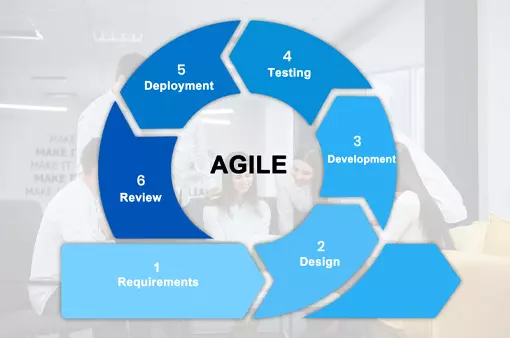
At O2B Technologies, we implement Odoo using an agile methodology grounded in short, repeated cycles. Rather than relying on traditional waterfall methods that defer testing until the end, agile breaks the implementation into iterative sprints. Each sprint produces tangible deliverables—such as configured modules, migrated datasets, or custom workflows—that your stakeholders can review and validate in real time.

This collaborative pathway integrates requirement analysis, gap evaluation, iterative configuration, user feedback, and incremental testing simultaneously. By maintaining short development and feedback loops, your organization minimizes project risk, accommodates operational refinements seamlessly, and ensures that the final deployed solution aligns precisely with your day-to-day requirements.

Agile Odoo Implementation Methodology

The 9 Steps of a Successful Odoo Implementation

1. Business Analysis and Requirements

Every successful deployment begins with comprehensive business analysis: auditing your operational processes, workflow bottlenecks, and administrative structures. A skilled functional Odoo consultant usually leads this business analysis phase, collaborating with key department leaders across sales, purchasing, inventory, manufacturing, and finance to document exactly how your company conducts business.

During this foundational discovery phase, the team focuses on four core activities:

  • Map current processes: Document end-to-end workflows, order flows, approval hierarchies, and department handoffs.
  • Gather requirements from each team: Interview department leads to record operational pain points, essential daily inputs, and reporting expectations.
  • Find the gaps against standard Odoo: Benchmark documented workflows directly against native Odoo apps to identify where out-of-the-box features fit and where operational gaps exist.
  • Decide what to change or customize: Determine whether to adapt company practices, leverage no-code Odoo Studio configurations, or commission targeted custom modules.

By translating operational practices into structured functional requirements, our team establishes a concrete, realistic foundation for the project that prevents costly scope creep later.

Business Analysis and Requirements Gathering in Odoo
Gap Analysis and Project Planning for Odoo ERP

2. Gap Analysis and Project Planning

Once requirements are gathered, functional consultants perform a rigorous gap analysis. This exercise compares your business requirements against standard, out-of-the-box Odoo capabilities. Where standard apps handle the workflow, native configuration is planned; where unique rules exist, the team scopes minor configurations or tailored customizations.

The gap analysis directly shapes the solution architecture and project charter. Our team establishes clear project milestones, resource allocations, delivery schedules, and risk mitigation strategies. At this stage, organizations also establish a realistic budget allocation covering software licenses, implementation partner work, user training, and ongoing post-launch support. Dedicated Odoo consultants, certified developers, and QA leads are assigned to execute each milestone with full transparency.

Plan the timeline and budget: Timelines depend on the number of modules, data volume and complexity, required customizations, and training needs. Budgets typically cover licenses, partner services, data migration, testing, training, and post-go-live support.

Start with core apps and phase the rest: Begin with core apps (e.g., Sales, CRM, Purchasing, Inventory, and Accounting), and add more complex modules like Manufacturing or advanced integrations in later phases to reduce risk. For full project support, our Odoo implementation services team can scope the plan based on your priorities.

O2B's Proven Delivery Model: Gap Analysis → Customization → Testing

To ensure stability and eliminate surprises at go-live, O2B adheres to a disciplined three-stage execution workflow throughout every deployment:

1. Gap Analysis

Our functional consultants audit business requirements and map native vs custom functionality, designing the most cost-effective solution roadmap before writing code.

2. Customization

Certified developers build clean, modular Python and XML code following Odoo best practices to isolate customizations from core files for long-term upgrade safety.

3. Testing

Quality engineers run iterative unit tests, end-to-end integration cycles, and structured user-acceptance validation to verify business flows prior to rollout.

3. Installation and Configuration

With the project roadmap finalized, the technical team provisions your Odoo environment. Depending on your operational preferences and compliance requirements, Odoo can be deployed on Odoo Online, Odoo.sh cloud infrastructure, or an on-premise private cloud server.

Following environment setup, consultants configure standard application modules to reflect your operational rules. This includes configuring charts of accounts, tax structures, fiscal localizations, payment gateway and carrier integrations, warehouse locations, reordering rules, user security access groups, and automated approval hierarchies. Proper configuration satisfies the majority of business requirements without writing unnecessary custom code.

Odoo Installation and Server Configuration
Odoo Software Development and Customization

4. Customization and Custom Development

While standard Odoo handles comprehensive business functions, unique workflows occasionally require specialized adjustments. We practice a disciplined customization approach: development is only undertaken when there is a clear, documented business advantage that standard configurations cannot fulfill. For deeper insights into this process, read our comprehensive Odoo customization guide.

Our developers follow modular coding practices, creating isolated custom modules that maintain compatibility with future version upgrades. Whether designing specialized invoice layouts, custom inventory algorithms, or third-party system and API integrations (such as ecommerce connectors, shipping carrier APIs, and EDI channels), our Odoo developers ensure clean, robust, and well-documented implementations.

5. Data Migration and Cleansing

Migrating historical records from legacy spreadsheets, QuickBooks, SAP, or proprietary databases into Odoo requires meticulous preparation. For detailed procedures and migration strategies, explore our Odoo migration guide.

Data migration follows a disciplined sequence: data cleansing, field mapping, test migrations, and final import. Master data—including customer directories, vendor profiles, charts of accounts, and product catalogs with bills of materials—is sanitized and migrated first. Once master records validate cleanly, opening financial balances, current inventory valuations, and open transactions are imported using secure scripts and validation protocols.

Data migration checklist:

  • Clean the data: Remove duplicates, fix typos, and standardize formats.
  • Map fields to Odoo: Match legacy fields to the correct Odoo models.
  • Decide how much history to bring: Bring what’s needed for operations and reporting.
  • Test-import into a copy: Run a test import in a staging database first.
  • Check totals after go-live: Validate key totals (invoices, balances, stock) post cutover.

O2B example: Our Odoo data migration services include building connectors (e.g., QuickBooks Desktop connector) to bring customers and invoices into Odoo, helping achieve high reconciliation accuracy like 98% in past projects.

Legacy Data Migration into Odoo ERP
Quality Testing and User Acceptance Testing in Odoo

6. Quality Assurance and User Acceptance Testing (UAT)

Before any system touches live operations, the entire build is deployed to an isolated staging environment. Our quality assurance analysts execute rigorous functional tests, verifying calculation logic, automated stock movements, accounting journal entries, and security permissions across multiple user roles.

Once internal QA validation is complete, your key stakeholders participate in User Acceptance Testing (UAT). Business users run through real-world operational scenarios—creating sales orders, running production orders, issuing invoices, and generating balance sheets. This hands-on validation catches edge cases early, verifies operational readiness, and instills team confidence prior to launch.

7. Live Deployment and System Cutover

Upon formal UAT sign-off, our technical team prepares for live deployment. A detailed cutover plan establishes a scheduled maintenance window, defines a strict change freeze on legacy systems, and coordinates final differential data migrations to ensure zero transactions are lost.

During deployment, engineers maintain strict validation checklists to prevent critical mistakes such as schema desynchronization, missing database constraints, or unverified permission levels. Once production DNS and SSL configurations are pointed to the live instance, end-to-end smoke tests verify that transactional emails, payment gateways, and inventory registers are operating seamlessly. Learn more about what to expect during initial cutover and stabilization in our post-go-live support guide.

Live Production Deployment and Cutover for Odoo
Role-Based Odoo ERP User Training

8. Role-Based User Training

Software is only as effective as the people operating it. Rather than broad, generic overviews, our functional consultants conduct role-based Odoo training tailored directly to daily operational responsibilities. Sessions are conducted interactively via Microsoft Teams, Zoom, or on-site at your facility.

Warehouse personnel learn mobile barcode scanning and dispatch workflows; accounting teams practice bank reconciliation, invoice matching, and financial reporting; sales reps master quotation tracking and CRM pipeline stages. Providing targeted hands-on instruction and tailored standard operating procedures (SOPs) dramatically accelerates user adoption.

9. Ongoing Support and Post-Launch Review

The implementation journey does not conclude on go-live day. During the immediate post-launch transition, our senior consultants provide hypercare support, monitoring system logs, resolving user queries promptly, and ensuring routine operations proceed without friction through our structured Odoo post-implementation support and maintenance plans.

Several weeks after cutover, we conduct a structured post-implementation review. Our team reviews system utilization metrics, user feedback, and operational performance against initial project goals. This review establishes a continuous improvement roadmap, outlining potential phase 2 automation enhancements as your organization expands.

Ongoing Odoo Support Maintenance and Post-Launch Review

Real-World Results: Manufacturing RAM Process Optimization

Discover how O2B Technologies partnered with an international manufacturing enterprise to overhaul their return merchandise and replacement authorization (RAM/RMA) workflow within Odoo ERP. By replacing fragmented spreadsheets with an automated Odoo pipeline, the client reduced warranty cycle times by 40% and established real-time quality analytics across departments.

Why Implement Odoo: Core Business Benefits

Deploying Odoo ERP centralizes operations, streamlines inter-departmental collaboration, and provides leadership with dependable visibility. Rather than managing disconnected point solutions, organizations leverage a unified platform designed to scale sustainably.

Key Architectural Advantages of Odoo

  • Fully modular architecture with 30+ core apps
  • Completely open-source Community edition for baseline needs
  • Scalable Enterprise edition with advanced features
  • Customizable design tailored to specific company workflows
  • Unified single-database architecture preventing data silos
  • 360-degree real-time dynamic reporting and operational dashboards
  • Extensive REST/XML-RPC API for external connectors
  • Proven fit for startups, mid-market, and multi-entity enterprises
Strategic Business Reasons to Implement Odoo ERP

6 Transformational Outcomes for Your Organization

Accountability & Operational Transparency

Centralizing data across sales, warehouse, and finance ensures comprehensive end-to-end audit trails, eliminating duplicate records and manual data-entry discrepancies.

Faster Decision-Making

Real-time analytics dashboards provide executives with live data on cash flow, inventory turnover, and production bottlenecks before operational delays impact clients.

Increased Team Productivity

Automating order handoffs, approval routing, and invoice creation frees staff to focus on high-value client initiatives rather than repetitive administrative data entry.

Seamless Information Flow

Breaks down departmental silos by connecting purchasing, fulfillment, manufacturing, and general ledger accounting on a synchronized database accessible across the company.

Cross-Departmental Collaboration

Shared visibility across purchase orders, stock levels, and support tickets empowers teams to communicate contextually, coordinate deliveries, and provide superior client service.

Lower Operating Expenses

Replacing scattered legacy subscriptions with an all-in-one ERP eliminates redundant software licenses, reduces IT maintenance overhead, and curbs manual reconciliation costs.

Project Timelines & Cost Drivers

How long an implementation takes and what it costs depends on four core factors: functional scope (number of apps deployed), total active users, data migration complexity, and whether bespoke workflows require custom development.

  • Small Implementations (4 to 6 weeks): Standard CRM, Sales, Invoicing, and basic Inventory with minimal custom code.
  • Mid-Sized Deployments (2 to 4 months): Integrated Manufacturing (MRP), multi-warehouse logistics, purchase approvals, and historical data migration.
  • Enterprise & Multi-Entity: Complex ERP rollouts involving custom API connectors, EDI automation, and phased rollouts.

Official software licensing fees are published directly on odoo.com/pricing, ensuring clear visibility into your software investment.

Implementation Mistakes to Avoid

Drawing from hundreds of ERP deployments, companies that encounter implementation friction typically stumble on preventable missteps:

  • Over-Customization: Rewriting standard Odoo modules to mirror legacy software quirks instead of adopting proven ERP best practices.
  • Dirty Legacy Data: Importing unverified, duplicate customer lists and inaccurate inventory counts without rigorous pre-migration sanitization.
  • Rushing Past UAT: Deferring user testing until live cutover, leaving edge-case bugs to disrupt active transactions.
  • Treating Training as an Afterthought: Failing to invest in role-specific end-user instruction, resulting in low team adoption and workflow hesitation.

Best Practices for Managing an ERP Rollout

Successfully managing an ERP deployment requires disciplined execution across all organizational levels. Focus on these four core best practices:

  • Set Clear, Measurable Goals: Establish clear operational targets upfront—such as reducing order cycle times by 30% or cutting month-end close to three days—before configuring any modules.
  • Involve End-Users Early: Engage the people who will actually use the system daily during discovery and workflow mapping to ensure the solution fits frontline realities.
  • Invest Heavily in Training: Dedicate adequate time and budget to role-based hands-on coaching and sandbox practice before going live to eliminate user hesitation.
  • Track Results After Go-Live: Establish regular post-launch reviews to measure adoption metrics, collect user feedback, and continuously refine automated workflows.

Common Implementation Challenges

Even well-funded implementations encounter operational hurdles. Proactively addressing these three common pitfalls keeps your project on track:

  • Data Migration Complexity: Legacy records often contain duplicate contacts, inconsistent units of measure, and obsolete inventory; begin data cleaning and validation early.
  • Resistance to Change: Employees accustomed to familiar spreadsheets and legacy software may resist new processes; active change management and leadership support are vital.
  • Scope Creep: Introducing new custom requirements mid-project inflates budgets and causes launch delays; maintain strict MVP discipline and schedule secondary features for Phase 2.

Managing Multi-Company or International Rollouts?

If your organization operates across international jurisdictions, multiple legal subsidiaries, or varied tax regimes, specialized configurations are required for multi-currency consolidations and inter-company invoicing. Review our detailed guide on Odoo ERP implementation across multiple countries to plan a coordinated international deployment.

Our Verdict

Most failed Odoo projects go wrong in steps 1, 2 and 5: unclear requirements, no gap analysis, and messy data. Spend the time there.

Planning an Odoo Rollout?

Get a step-by-step implementation plan from O2B's certified team in Austin. We evaluate your workflows, map your data, and deliver a smooth cutover.

Odoo implementation services

Frequently Asked Questions

Why should I choose an Odoo Ready partner?

An official Odoo Ready Partner brings certified technical consultants, proven deployment workflows, and direct access to Odoo enterprise support. Working with a recognized partner helps avoid costly implementation missteps, ensures clean custom code, and keeps your Odoo running bug-free and aligned with future upgrade paths.

What is the Odoo implementation methodology you follow?

We follow an agile implementation methodology broken down into short, repeated iterations. This delivers functional deliverables in phases, provides early visibility into software behavior, and enables continuous client feedback rather than waiting months for a high-risk big-bang launch.

What does Odoo implementation cost?

Implementation costs depend on the number of apps deployed, total user count, historical data migration volume, and whether unique business rules require custom module development. Standard licensing fees are transparently published on odoo.com/pricing, while implementation services are scoped based on business requirements.

How long does an Odoo implementation take?

A standard deployment with core apps (such as CRM, Sales, and Invoicing) typically takes 4 to 6 weeks. Mid-sized companies requiring manufacturing, inventory, and automated accounting rollouts generally take 2 to 4 months. Complex enterprise deployments with legacy integrations may take longer.

Can we go live in phases?

Yes. A phased rollout is often recommended to minimize operational disruption. Organizations frequently launch core financial and sales operations in Phase 1, followed by advanced warehouse management, manufacturing (MRP), and specialized customer portals in subsequent phases.

What would be the additional cost after Odoo goes live?

Post-launch costs generally center on optional support and maintenance service packages. These packages provide dedicated assistance for routine user queries, minor process tweaks, periodic maintenance, and new feature development as business requirements evolve.

Do you provide Odoo support and maintenance services?

Yes, O2B Technologies offers flexible support and maintenance arrangements on both an hourly and monthly retainer basis. You can reach out directly to info@o2btechnologies.com for dedicated technical and functional support.

Are customization and implementation different?

Yes. Implementation focuses on installing, configuring, and aligning standard Odoo modules to your business workflows without altering core source code. Customization involves software engineering to build bespoke modules, custom business logic, dashboard widgets, or specialized third-party API connectors.