We at O2B technologies have been serving our customers on multiple occasions,
ranging from diverse
industry verticals, with all the services related to Odoo. Throughout the years of implementing all
kinds of Odoo solutions, we have also come across a few growing brands that are also struggling with
the efficiency of their all kinds of accounting software. Some of the main primary issues with such
accounting software were their inability to even scale with the increasing volumes of transactions
of all the businesses.
As a result, we also helped many of our clients implement Odoo ERP to streamline all the accounting
tasks. Odoo also comes with the release of the Odoo 19 version of the accounting app, which
seamlessly helps to manage financial transactions, processes, and even records. From just a robust
invoicing system and even automating certain tasks to even integrating with all the third-party
apps, Odoo accounting is also a comprehensive and lightning-fast solution. Being a customizable ERP,
you can easily customize Odoo accounting according to your business needs and even its resources.
Let us talk more about ODOO accounting features in this article.
Looking for Odoo Implementation, Customization, Integration, or Support Services?
Benefits of Odoo Accounting Software

Here are some potential benefits of Odoo accounting software:
Why use Odoo accounting?
Financial Management
The Odoo accounting gives businesses real-time visibility into their financial health with all the dynamic dashboards and even its reporting tools, you can instantly track incomes, expenses, cash flows, and all profits. The automations booking also ensures that invoices, payments, and even their reconciliations are recorded accurately, which also reduces the scope of manual errors. The built-in bank sync features also make it very easy to connect with all the US banks, which also enables quick and reliable reconciliation.
Cost efficiency
When you stand alone as an accounting software, Odoo accounting is also a part of the complete ERP suite, making it more right-sized investment and even more cost-effective. After choosing Odoo, businesses don't need to invest in multiple tools since Odoo handles all the important parts of accounting, inventory, and more within the platform. By automating this as a repetitive task for all the accounting, and even minimizing the human errors and it also saves both time and operational costs.
Integrations & flexibility
The Odoo accounting seamlessly integrates with all the other Odoo modules like sales, purchase, HR, and even inventory, or the third-party apps such as all the payment gateways, payroll systems, and all the e-commerce platforms. When you're in a small business, all the large enterprises, Odoo can be customizable modules and easily adapts to all the unique accounting needs.
Productivity & automation
One of the biggest advantages of the Odoo accounting is its automation capabilities. The business can set up all the smart invoicing to automatically generate all the invoices, send all the reminders for all the overdue payments, and even track receipts. The expense management is also about simplifying, as all employees can also upload receipts for faster approvals. With all the multi-currency support, companies also handle global transactions, which can easily help you to manage conversions and even exchange rate fluctuations.
Scalability
As the businesses grow there all the accounting needs become more complex for the users. Odoo is built to scale with your company's growth. It also supports multi-company management, enabling organizations with multiple kinds of entities or even branches to consolidate all the financial data seamlessly.
The Odoo accounting features for smooth financial transactions
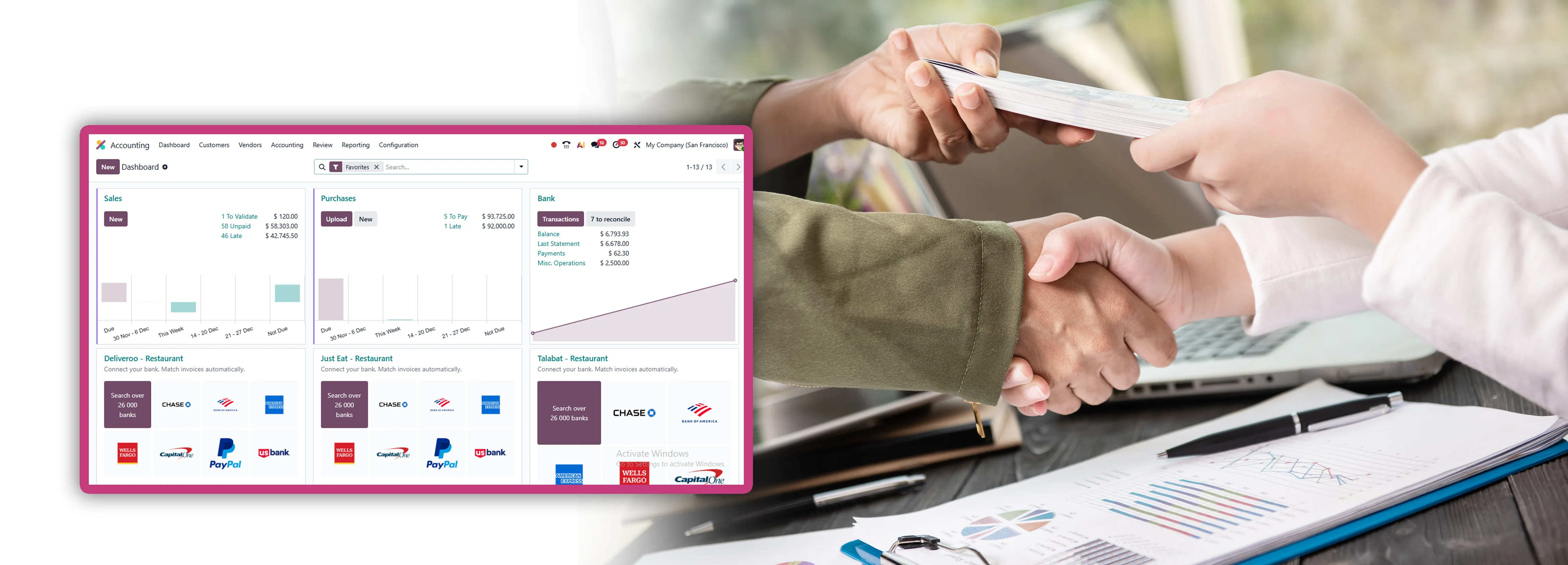
The Odoo accounting is a very user-friendly accounting software that helps you to get rid of the frustrations, which are also caused by all the slow interfaces, overflowing all the email inboxes, and even the endless data. The most fascinating is also its speed. The Odoo processes can perform their operations in less than 90 milliseconds. Isn't it interesting? Your accountant can accomplish more tasks in less time with Odoo.
The Odoo mobile app serves as a handy and even go-to companion that also offers the next level of flexibility. It also helps to let you perform tasks and even maintain records on the fly. The push notifications can help you stay posted on every kind of task to perform.
Odoo accounting is a very user-friendly accounting software which helps you to get rid of the frustrations which is caused by the slow interfaces, overflowing email inboxes, and even the endless data. What is more fascinating and even its speed. The processes and any operations are completed in less than 90 milliseconds. Isn't it great? Yes, of course! Hence, your accountants can also accomplish more tasks within less time with Odoo.
Besides the Odoo mobile app, it also serves as a handy and even its go-to companion, which also offers the next level of flexibility. It also lets you perform tasks and even maintain the records on the fly. The push notifications also keep you posted on every kind of task to perform.
Let us know more in detail about the accounting features of Odoo.
1. Accounts receivable and payable
With the Odoo accounting, you can also manage both receivable and payable money.
Attractive Invoice template: you can also create customized invoices with the templates for the company, and also fine-tune font colors and even its style.
Credit notes & refunds: It is possible to even create a customer or vendor credit note, which is directly from all the customer invoices or the vendor bills.
Quick invoice draft: Odoo automatically creates draft invoices based on all the orders, subscriptions, timesheets, and delivery details.
Multi-currency support: Odoo supports multiple currencies and even provides all the updated currency rates daily.
2. Get paid easily
The Odoo accounting offers several features that also help you get paid easily. Let us have a glance at those features below.
Online payments: the customers can pay you from different payment methods of their choice. Odoo accounting is designed to support some of the major payment gateways like Stripe, PayPal, and many more.
Direct payments: Odoo accounting supports SEPA direct debit and lets you create all the necessary mandates with the customers regarding the same.
Customer portal: Through the customer portal, your customers can view, download, and pay all the invoices online. It can help you to manage their subscriptions, sign documents, send messages, track order status, and much more.
Mobile payments with QR codes: Odoo lets you add your QR code to invoices, which also allows customers to pay the amount from all mobile banking applications.
3. Pay Bills
When paying bills through Odoo's accounting software, is just like the breeze.
Automate wire transfers: automate supplier payments with SEPA credit transfers (SCT).
Batch payments: the batch payments let you group different payments, and even simplify the reconciliation process and bank check deposits.
Print checks: print checks in batches with just a few clicks, and even manage the supplier bills.
4. Easy reconciliation
The Odoo accounting comes with a smart reconciliation tool that is additionally used for matches between invoices and payments. You get a user-friendly interface to manually reconcile open and even all the paid invoices. This interface is especially comes in handy especially for payments and even handles those that couldn't match.
5. Legal statements
The following are some noteworthy features of all the managing legal statements in the Odoo accounting:
In-depth and even dynamics: it is possible to even see the slightest changes in all the accounting.
Advance taxes management: Odoo comes with a wide range of tax computations, such as percentage, prices, and even everything.
Tax reports: you can also get your tax reports in the accrual or even cash-based format according to the country's new taxation regulations.
Tax audit report: It's important to check how your tax report is computed for all the audits through all the tax audit reports.
Cash basis taxes: this feature also enables you to even report incomes and all the expenses to your fiscal administrations.
Analytic accounting: designed to analyze financial statements to make informed decisions for all the decisions within an organization. The following are the analytics of the accounting features of Odoo.
The arch of cost accounts: You can also structure your analytics accounts automatically based on all kinds of projects, contracts, departments, etc.
Analytics distributions: the invoices/bills come with all the analytics, which also help you to create analytics and distributions directly from invoices.
Multiple plans: it helps to manage multiple analytics plans and even their sub-plans with some of the specific conditions for all the applicability. These plans also enable you to create customized multi-dimensional structures for all the analytics.
Budget management: it helps to manage and even track the budget of your financial accounting, and even compare the actual performances for all the different budgets.
Mass edit: Odoo lets you have access to all of your analytics items and mass edit them without the need to open any kind of invoice.
7. Assets, expenses & revenue recognitions
With all the new Odoo accounting assets management and event and revenue recognition becomes easy. It helps to manage all the events on your assets in just a few clicks, track assets, and automatically generate amortization entries.
8. Global compatibility
Irrespective of any corner of the world, Odoo accounting works everywhere; it's also compatible worldwide.
9. Multi-companies and multi-currency support
The most admired features of the Odoo accounting are that it lets you pay for only one kind of subscription and brings all your subsidiaries under one roof. It can help you manage the accounting.
10. AI-powered invoice digitization
With the design of the AI-powered invoice digitization, Odoo also lets you upload the scanned PDF or even all the image format files, and automatically reads and decodes all the information from them.
11. Integrations with other apps
The Odoo accounting also seamlessly integrates with all the other Odoo modules and apps, like the sales, inventory, purchase, and many more. It helps to integrate with all the third-party applications, like the tax cloud, a cloud-based sales tax compliance software.
12. Import and export data
As Odoo supports integrations with all third-party apps, it also becomes easy to import data from all kinds of external sources and even export data from Odoo to external systems and files.
Invoicing in Odoo: Streamlined Billing from Quote to Payment
While comprehensive financial accounting (such as automated bank reconciliation, asset depreciation, dynamic general ledgers, and multi-currency revaluation) is exclusive to Odoo Enterprise, the standalone Odoo Invoicing application is available in both Odoo Community and Enterprise. It enables growing businesses to streamline their entire billing lifecycle without requiring complex accounting setup on day one:
- Quote to Invoice in One Click: When a customer accepts a sales quote or contract, Odoo automatically generates a draft invoice carrying over all product lines, quantities, unit prices, discounts, and tax rates with zero re-typing or manual data transfer.
- Recurring Invoices (Subscriptions): For companies providing ongoing support retainers, software subscriptions, or recurring service agreements, Odoo Subscriptions automates periodic billing cycles, triggers automatic card renewals, and sends renewal notices.
- Instant Payment Links: Generate secure, single-click payment links directly from invoice records. Customers receive professional email invoices with an instant payment button supporting credit cards, ACH, PayPal, and Stripe without needing a system login.
- Automatic Payment Reminders: Configure automated follow-up sequences that trigger polite email or SMS reminders as due dates approach and escalate notifications for overdue accounts, helping finance teams collect outstanding receivables faster.
- Self-Service Customer Portal: Clients can log into a branded, secure web portal to review past transaction history, download official PDF invoices, sign quotations, and track order fulfillment status in real time.
Cloud vs. Desktop Accounting: Why Modern Businesses Are Moving to Odoo
Traditional desktop accounting software often locks financial data to on-premise hardware, requiring manual updates, local file transfers, and tedious administrative upkeep. In contrast, cloud-based accounting with Odoo provides continuous operational agility:
- Access from anywhere: Finance teams, department leaders, and external CPAs can securely access real-time financial dashboards, journals, and reports from any web browser or mobile device without VPN friction.
- Automatic backups and high security: Eliminates the risk of catastrophic data loss caused by hardware failure or local ransomware. Your financial ledger is continuously backed up with enterprise-grade data protection.
- Live automated bank feeds: Direct synchronization with thousands of banks automatically imports daily bank statements, eliminating error-prone manual CSV imports and saving hours each reconciliation cycle.
- Zero local server maintenance: No local servers, dedicated IT maintenance staff, or annual manual installation disks required. System upgrades and security patches deploy seamlessly.
For businesses looking to move away from legacy desktop platforms like QuickBooks Desktop, Sage, or outdated accounting setups, O2B Technologies offers seamless Odoo migration services to transition chart of accounts, open invoices, customer balances, and historical ledgers without downtime.
Odoo Accounting Pros and Cons
When evaluating Odoo Accounting as an enterprise financial management solution, businesses benefit from weighing its architectural strengths against specific operational requirements:
Pros of Odoo Accounting
- Unified ERP ecosystem: Natively connected with Odoo Sales, Purchase, Inventory, Point of Sale, and Manufacturing—eliminating double-entry and external synchronization headaches.
- Live bank synchronization: Direct feeds with thousands of worldwide financial institutions automatically pull daily bank statements.
- Automated smart reconciliation: Machine learning and automated reconciliation models match incoming payments and statement lines with open invoices at up to 95% automation.
- Multi-company and multi-currency: Manage unlimited subsidiaries, branches, and foreign currencies with real-time exchange rates, intercompany transactions, and consolidated reporting.
Cons of Odoo Accounting
- Enterprise-only app: Full Accounting (bank synchronization, reconciliation models, asset depreciation, dynamic financial reports) is exclusive to Odoo Enterprise; Odoo Community includes basic customer invoicing and vendor billing only.
- US localization requires setup: Multi-state sales tax compliance (AvaTax / TaxJar integrations), 1099 vendor filing, and bank check print formats need deliberate initial configuration.
- Learning curve from standalone tools: Accounting teams transitioning from traditional standalone software like QuickBooks or Sage need initial training to navigate Odoo's integrated, journal-driven ERP workflows.
Industries and Use Cases
Odoo Accounting adapts to specific operational workflows across diverse business sectors:
- Retail: Syncs daily POS register sessions, merchant gateway fees, cash drawer reconciliations, and retail inventory valuations into one unified general ledger.
- Manufacturing: Automatically tracks work-in-progress (WIP), raw material consumption, landed freight costs, and production labor directly through Bills of Materials.
- E-commerce: Reconciles high-volume online orders, payment gateway payouts (Stripe, PayPal, Authorize.net), customer prepayments, and automated digital tax receipts.
- Service-Based Businesses: Generates accurate customer invoices from billable consultant timesheets, project milestone completions, and client expense claims.
- Hospitality: Consolidates multi-outlet revenue streams across room reservations, dining POS terminals, event catering, and vendor procurement.
Odoo Accounting for US Businesses
For companies operating in the United States, Odoo Enterprise provides dedicated US localization packages and integrations designed to address domestic financial regulations, banking protocols, and reporting requirements:
- US Chart of Accounts (Localization): The official USA localization package (
l10n_us) preconfigures a standard US GAAP-aligned Chart of Accounts, default income/expense journals, and fiscal positions, ensuring clean financial statements from day one. - Sales Tax Setup & AvaTax Connector: Manage state and municipal sales taxes using native fiscal positions, or connect Odoo's certified Avalara AvaTax integration to calculate rooftop-accurate sales tax rates across multiple jurisdictions. This automated calculation helps support sales tax compliance and audit preparedness across diverse states.
- 1099 Reporting for Contractors: Track payments to freelance contractors and 1099 vendors directly in Odoo. The system records qualifying 1099-NEC and 1099-MISC expenditures and generates clean export reports formatted for IRS e-filing or your CPA.
- Check Printing & NACHA ACH Payments: Print standard checks directly on pre-printed or blank check stock with customizable layout positions (top, middle, bottom). For electronic disbursements, generate standard NACHA batch files to process direct deposit ACH vendor payments and customer debits through any US commercial bank.
Odoo vs. QuickBooks vs. Xero: Which Accounting Solution Fits Your Business?
Many growing businesses begin their financial operations on QuickBooks Online or Xero before encountering functional limits as transaction volumes, inventory complexity, and entity counts expand. Here is an architectural comparison of how Odoo compares against standalone accounting systems without outdated pricing estimates:
| Comparison Factor | Odoo Accounting | QuickBooks Online | Xero |
|---|---|---|---|
| Core Focus & Architecture | Complete modular ERP connecting accounting natively with CRM, Sales, Inventory, and Manufacturing. | Standalone small business bookkeeping and financial reporting tool. | Cloud-first bookkeeping application focused on small businesses and external accountants. |
| Built-in Inventory | Advanced multi-warehouse, barcode scanning, landed costs, serial/lot tracking, and automated valuation. | Basic inventory tracking only on higher plans; lacks multi-warehouse routing and landed cost calculation. | Basic periodic stock tracking; requires third-party add-ons for manufacturing or advanced warehousing. |
| Built-in Payroll | Integrated employee records, work entries, timesheets, and payroll journal entries within one database. | Available as an add-on payroll subscription with direct deposit. | Offered via third-party partnerships (e.g. Gusto) depending on region. |
| Multi-Company & Multi-Currency | Native unlimited multi-company, multi-branch, and multi-currency consolidation in a single database. | Separate paid subscription required for each legal company or subsidiary. | Separate subscription required for each legal organization; multi-currency restricted to higher tiers. |
| Best Fit For | Growing mid-market enterprises, manufacturers, distributors, and multi-entity organizations needing connected operations. | Small service businesses, sole proprietors, and small retail shops needing straightforward bookkeeping. | Early-stage startups, freelancers, and small agencies collaborating closely with external CPAs. |
| Switching & Migration Difficulty | Moderate; requires chart of accounts mapping, master data cleansing, and opening balance reconciliation (handled by O2B migration experts). | Low to moderate when migrating from spreadsheets or legacy desktop versions. | Low when importing standard CSV chart of accounts and customer balances. |
| Official Vendor Pricing | View Odoo Official Pricing | View QuickBooks Official Pricing | View Xero Official Pricing |
If your organization is outgrowing QuickBooks or Xero due to inventory limitations, disjointed add-ons, or multi-company friction, explore our dedicated Odoo migration services to transition ledgers, contacts, and open transactions seamlessly.
Conclusion
It has a complete overview of accounting features in Odoo. These features simplify and automate accounting tasks, giving your accountants peace of mind. The seamless integrations with other modules make Odoo stand out from others. The exchange of data between different Odoo modules becomes effortless. It helps to reduce the hardships of accountants and saves their valuable time and effort.